General Properties
Every RouterBOARD with a miniPCI-e slot which supports LTE modems can also be used as a LoRaWAN gateway by installing an R11e-LoRa8 or R11e-LoRa9 card. Both UDP and LNS (starting with v7.12rc1 testing version) protocols are supported.
In order to work with LoRa, the IoT package should be installed. You can find the package for your device architecture in the extra packages archive on the download page.
Important: Starting with v7.11 (stable), LoRa functionality is moved into the IoT package that is available on the download page under extra packages. A separate Lora package is still available for download.
When using the IoT package, LoRa functionality will move to a /iot/lora sub-menu. When using the LoRa package, LoRa functionality will be possible via /lora sub-menu.
The LoRa package is not obligatory anymore and is left only for compatibility reasons.
Caution: Note: RouterOS does not support 3rd party LoRaWAN gateway cards.
Properties
This menu is used to apply settings to the LoRa interface.
Sub-menu: /iot/lora
| Property | Description |
|---|---|
| antenna-gain (integer [-128..127]; Default: 0) | Antenna gain in dBi. This value should be equal to setup-antenna-gain minus cable-loss. Using a 6.5 dBi antenna, 6.5 is the value to be configured (not taking into account cable loss). Output power of the gateway is dictated by the server. The gateway will calculate its actual output power by subtracting antenna-gain setting from server_value (value received in the downlink message). |
| channel-plan (as-923 | au-915 | custom | eu-868 | in-865 | kr-920 | ru-864 | ru-864-mid | us-915-1 | us-915-2; Default: eu-868) | Frequency plans for various regions. |
| disabled (yes | no; Default: yes) | Whether LoRaWAN gateway is disabled. |
| forward (crc-validation | dev-addr-validation | proprietary-traffic; Default: crc-validation) | Defines what kind of packets should be forwarded to Network server:
|
| gateway-id(string) | Gateway ID or Gateway EUI is used when registering the gateway with the server. |
| lbt-enabled (yes | no; Default: no) | Whether the gateway should use LBT (Listen Before Talk) protocol. |
| listen-time (integer [0us..4294967295us]; Default: 5000us) | Time in microseconds to track RSSI before TX (used when lbt-enabled=yes). |
| name (string; Default: ) | Name of LoRaWAN gateway. |
| network (private | public; Default: public) | Whether sync word should (network=private) or should not (network=public) be used. |
| rssi-threshold (integer [-32,768 .. 32,767]; Default: -65dB) | RSSI value to determine whether the forwarder may use a specific channel to talk. If RSSI value is below rssi-threshold, channel could be used (used when lbt-enabled=yes). |
| servers (list of string; Default: ) | Name of the server from the /iot/lora/servers section. |
| src-address (IP; Default: ) | Specifies the uplink packet source address if necessary (address should match an address configured on the RB). |
| spoof-gps (string; Default: ) | Set custom GPS location:
|
Once the server is selected and the LoRa interface is enabled using the /iot/lora/enable [find] command, the device will start operating as a LoRaWAN gateway. It will start forwarding LoRa payloads from the /iot/lora/traffic tab to the configured server.
Channels
This section is used to alter channel/frequency related settings.
Sub-menu: /iot/lora/channels
| Property | Description |
|---|---|
| bandwidth (7.8_kHz | 15.6_kHz | 31.2_kHz | 62.5_kHz | 125_kHz | 250_kHz | 500_kHz; Default: 125_kHz) | Bandwidth of a specific channel, predefined when any of the channel-plan presets is used, but could be manually changed when the channel-plan is set to custom. |
| disabled (yes | no; Default: no) | Disable or enable the channel. |
| freq-off (integer [-400000..400000]; Default: ) | Channel frequency offset against radio central frequency, it makes it possible to adjust channel frequencies so that channels do not overlap. |
| radio (radio0 | radio1; Default: ) | Defines which radio uses the selected channel. |
| spread-factor (SF7 | SF8 | SF9 | SF10 | SF11 | SF12; Default: ) | Defines the Spread Factor for a channel with type=LoRa. Lower Spread Factor means higher data rate. |
To view current channels, issue the command /iot/lora/channels/print:
/iot/lora/channels/print
Columns: NAME, TYPE, RADIO, FREQ-OFF, BANDWIDTH, FREQ, SPREAD-FACTOR, DATARATE
# NAME       TYPE  RADIO   FREQ-OFF  BANDWIDTH  FREQ   SPREAD-FACTOR  DATARATE
0 gateway-0  MSF   radio1  -400000   125_kHz    868.1
1 gateway-0  MSF   radio1  -200000   125_kHz    868.3
2 gateway-0  MSF   radio1  0         125_kHz    868.5
3 gateway-0  MSF   radio0  -400000   125_kHz    867.1
4 gateway-0  MSF   radio0  -200000   125_kHz    867.3
5 gateway-0  MSF   radio0  0         125_kHz    867.5
6 gateway-0  MSF   radio0  200000    125_kHz    867.7
7 gateway-0  MSF   radio0  400000    125_kHz    867.9
8 gateway-0  LoRa  radio1  -200000   250_kHz    868.3  SF7
9 gateway-0  FSK   radio1  300000    125_kHz    868.8                    50000
Channels are created using freq-off and radio's center-freq frequencies. To view radios' center frequencies use the command /iot/lora/radios/print.
To understand how each channel's frequency is calculated, check the example below:
# NAME       TYPE  RADIO   FREQ-OFF  BANDWIDTH  FREQ   SPREAD-FACTOR  DATARATE
0 gateway-0  MSF   radio1  -400000   125_kHz    868.1
radio1 is selected to be used for channel #0 and it is configured with center-freq=868500000 (868500000 Hz or 868.5 MHz).
By using a frequency offset, freq-off=-400000 (-400000 Hz or -0.4 MHz), we define channel #0 to be 868500000-400000=868100000 Hz or 868.1 MHz.
To configure custom channels, select "custom" channel profile with the help of the command:
/iot/lora/set [find] channel-plan=custom
Join EUI
The gateway will forward to the server every single LoRaWAN payload it receives. That includes neighboring LoRaWAN node's payloads as well. It might not be ideal to forward everything, as, for example, it can increase the data amount used (and directly impact ISP plan cost).
The Join EUI menu allows you to specify a blacklisted or a whitelisted range of JOIN EUIs that the gateway should forward (if it is "whitelisted") or should block (if it is "blacklisted"). After adding the range, make sure to apply it to the server settings.
The filters work using the following principle:
-
By default, everything is allowed (unless whitelist/blacklist filters are added);
-
If "blacklist" filter range is added, and then a JOIN EUI packet that matches the blacklisted range appears nearby → it is dropped;
-
If "whitelist" filter range is added, it has priority over the "blacklisted" filters. Meaning that if both "blacklist" and "whitelist" match the same JOIN EUI, "whitelist" takes priority and the packet is forwarded.
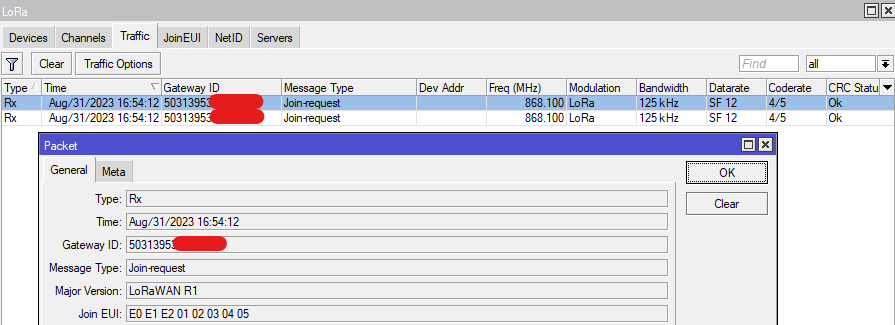
You can find the Join EUI used by your node with the help of the RouterOS GUI. Go to the "LoRa" section and to the "Traffic" sub-menu (which is only available using the graphical interface). After you power your LoRaWAN node, the node should send a "Join-request" packet. Double-click on it to inspect it:
Sub-menu: /iot/lora/joineui
| Property | Description |
|---|---|
| joineui (string; Default: ) | Defines a range of Join EUIs. |
| logging(yes | no; Default: no) | Enables additional logging for the filter feature. |
| name (string; Default: ) | Defines the name for the range. |
| type (blacklist | whitelist; Default: whitelist) | Defines the type for the filter:
|
An example of Join EUI would look like this E0 E1 E2 01 02 03 04 05. It consists of 8 octets in HEX format.
To add a range that blocks everything, add a filter like this:
/iot/lora/joineui/add name=block_all joineuis=0000000000000000-ffffffffffffffff type=blacklist logging=yes
To allow a specific single Join EUI, add a filter like this:
/iot/lora/joineui/add name=allow_my_node joineuis=E0E1E20102030405-E0E1E20102030405 type=whitelist logging=yes
Disable LoRa interface:
/iot/lora/disable [find where ]
Apply both ranges to the LoRa server you are using and enable the interface again:
/iot/lora/servers/set joineui=block_all,allow_my_node [find where ~ "eu1.cloud.thethings.network"]
/iot/lora/enable [find where ]
As a result, we will only allow "JOIN EUI=E0 E1 E2 01 02 03 04 05" node payloads to be forwarded, while every single possible other JOIN EUI will be dropped by the blacklist rule.
Network ID
The gateway will forward to the server every single LoRaWAN payload it receives. That includes neighboring LoRaWAN nodes' payloads as well. It might not be ideal to forward everything, as, for example, it can increase the data amount used (and directly impact ISP plan cost).
The NetID menu allows you to specify a blacklisted or a whitelisted range of NetIDs that the gateway should forward (if it is "whitelisted") or should block (if it is "blacklisted"). After adding the list, make sure to apply it to the server settings.
The filters work using the following principle:
-
By default, everything is allowed (unless whitelist/blacklist filters are added);
-
If "blacklist" filter range is added, and then a NetID of the packet matches the blacklisted range → it is dropped;
-
If "whitelist" filter range is added, it has priority over the "blacklisted" filters. Meaning that if both "blacklist" and "whitelist" match the same NetID, "whitelist" takes priority and the packet is forwarded.
NetIDs define the ranges of Device Addresses (DevAddr) that were assigned to different operators/servers by the LoRaWAN Alliance. A list with most ranges can be found in the TTN guide.
DevAddr is assigned to the LoRaWAN node by the LoRaWAN server after the communication with the server takes place. For example, TTN will assign your node an address from within the range 26000000 - 27FFFFFF. You can find it under the LoRaWAN server dashboard or using the RouterOS GUI, under the "Traffic" sub-menu (after "join-request" and "join-accept" communication takes place) in the Dev Addr column/field.
Let's say TTN assigned 26 1B D8 D1 Dev Addr to your node. Based on the TTN guide, it falls under the 26000000 - 27FFFFFF DevAddr range and it belongs to the 000013 NetID.
Sub-menu: /iot/lora/netid
| Property | Description |
|---|---|
| netids (string; Default: ) | Define the NetIDs |
| logging(yes | no; Default: no) | Enables additional logging for the filter feature. |
| name (string; Default: ) | Define the name for the ID. |
| type (blacklist | whitelist; Default: whitelist) | Define the type for the filter:
|
To add a filter that allows a specific NetID (in this example, 000013 NetID, which belongs to TTN), use the command:
/iot/lora/netid/add name=allow_TTN netids=000013-000013 type=whitelist
To block all other NetIDs use type=blacklist:
/iot/lora/netid/add name=block_all netids=000000-ffffff type=blacklist
Disable LoRa interface:
/iot/lora/disable [find where ]
Apply both ranges to the LoRa server you are using and enable the interface again:
/iot/lora/servers/set netid=block_all,allow_TTN [find where ~ "eu1.cloud.thethings.network"]
/iot/lora/enable [find where ]
Servers
This section is used to add new or alter current server settings.
Sub-menu: /iot/lora/servers
There are a few predefined servers that can be used (it requires making a The Things Network account to use them):
[admin@MikroTik] /iot/lora/servers/print
Columns: NAME, UP-PORT, DOWN-PORT, ADDRESS
# NAME UP-PORT DOWN-PORT ADDRESS
0 TTS Cloud (eu1) 1700 1700 eu1.cloud.thethings.industries
1 TTS Cloud (nam1) 1700 1700 nam1.cloud.thethings.industries
2 TTS Cloud (au1) 1700 1700 au1.cloud.thethings.industries
3 TTN V3 (eu1) 1700 1700 eu1.cloud.thethings.
4 TTN V3 (nam1) 1700 1700 nam1.cloud.thethings.
5 TTN V3 (au1) 1700 1700 au1.cloud.thethings.
Custom servers can be added as well. Data forwarding to multiple servers can work simultaneously if the first server does not change the "DevAddress" part of the packet and under the condition that all servers are able to decode the packet.
| Property | Description |
|---|---|
| address (domain name or IP address; Default: ) | Defines the LoRaWAN Network server address. |
| name (string; Default: ) | Defines the server name. |
| protocol (UDP | LNS | CUPS; Default: UDP) | Specifies whether to use UDP, LNS or CUPS protocol for the communication with the LoRaWAN server. |
| down-port (integer [0..65535]; Default: 1700) | Parameter that is used when UDP protocol is selected. Defines the port for down-link communication (from server to node) with the LoRaWAN Network server. Most of the known open source servers use port 1700 as default, but it can change if multiple servers are configured on the same machine. |
| up-port (integer [0..65535]; Default: 1700) | Parameter that is used when UDP protocol is selected. Defines the port for up-link communication (from node to server) with the LoRaWAN Network server. Most of the known open source servers use port 1700 as the default, but it can change if multiple servers are configured on the same machine. |
| netid(list of string; Default: ) | Parameter that is used when UDP protocol is selected. Applies a filter to only send LoRaWAN payloads that match the Network ID (Net ID) filter configured. |
| joineui (list of string; Default: ) | Parameter that is used when UDP protocol is selected. Applies a filter to only send LoRaWAN payloads that match the Join EUI filter configured. |
| port (integer [0..65535]; Default: 8887) | Parameter that is used when LNS or CUPS protocol is selected. For LNS, defines the WSS (WebSocket) port and, for CUPS, defines the HTTPS port. |
| key (string; Default: ) sensitive | Parameter that is used when LNS or CUPS protocol is selected. Specifies the LoRa Basics Station LNS Authentication Key or CUPS API KEY (both generated on the server). |
| ssl (yes or no; Default: no) | Parameter that is used when LNS or CUPS protocol is selected. Specifies whether to use or not to use SSL (if the server supports TLS server authentication). When this option is chosen, root SSL certificate(s) must be uploaded under the certificates menu. |
| certificate (list of string; Default: none) | Parameter that is used when LNS or CUPS protocol is selected. Selects an uploaded client certificate (if the server awaits TLS client authentication). If TLS client authentication is not required by the server, use the default "none" setting. |
| interval(integer [0..65535]; Default: ) | Parameter that is used when CUPS protocol is selected. Specifies the interval with which the LoRa Basics Station will query the CUPS server for configuration updates/changes. |
There are a few pre-configured The Things default servers. If you deleted one and want to recover default servers, you can use the command:
/iot/lora/servers/reset-servers
Please be warned that resetting servers will delete all previously configured servers as well, so make sure to "save" them beforehand.
Traffic
This section displays LoRa payloads that were broadcasted by the surrounding nodes.
Sub-menu: /iot/lora/traffic
| Property | Description |
|---|---|
| options | Allows to configure additional options for the traffic tab:
|
| clear | To clear the list (to remove all entries). |
To view the list, use the print command:
[admin@MikroTik] /iot/lora/traffic/print
Columns: TIME, GWID, MSGTYPE, DEVADDR, MVER, FCNT, CRC, TYPE, JOINEUI, DEVEUI
 #  TIME                             GWID  MSGTYPE                DEVADDR      MVER         FCNT  CRC    TY  JOINEUI                  DEVEUI
 0  2024-11-08 13:33:28  xxxxxxxxxxxxxxxx  Unconfirmed Data Up    6C B9 XX XX  LoRaWAN R1  59434  Error  Rx
 1  2024-11-08 13:33:50  xxxxxxxxxxxxxxxx  Rejoin-request                      LoRaWAN R1         Error  Rx                           50 62 9F FE XX XX XX XX
 2  2024-11-08 13:34:09  xxxxxxxxxxxxxxxx  Unconfirmed Data Down  5E 00 XX XX  RFU         41736  Error  Rx
 3  2024-11-08 13:34:15  xxxxxxxxxxxxxxxx  Rejoin-request                      RFU                Error  Rx                           D9 C2 BD 4B XX XX XX XX
 4  2024-11-08 13:34:55  xxxxxxxxxxxxxxxx  Join-request                        LoRaWAN R1         Error  Rx  A1 AE B1 8A XX XX XX XX  F4 62 81 BE XX XX XX XX
To clear the list (to remove all entries), issue the clear command:
[admin@MikroTik] /iot/lora/traffic/clear
The Traffic tab displays "LoRa" payloads. As soon as the LoRa interface is enabled with the /iot/lora/enable [find] command, all the payloads from the list will be converted into TCP/UDP packets (depending on whether you use UDP 1700 or LNS/CUPS protocol) and forwarded to the configured server.
If you do not wish to use LoRaWAN topology, and if you wish to forward "raw" LoRa payloads to your own server, you have an option to do so, using MQTT or Fetch to run the script with an interval of your choice to constantly send the data.
A basic example (first step in the script) on how to convert traffic payloads into a variable called "traffic":
[admin@MikroTik] > :global traffic;:set traffic [/iot/lora/traffic/print as-value ];put $traffic
.id=*4f;band=125 kHz;coderate=?/?;counter=890652548;crc=Error;datarate=SF 7;freqhz=868300;gwid=50313xxxxxx;ifcha
in=1;mod=LoRa;msgtype=Proprietary;mver=RFU;rfchain=1;rssi=-116.00;rxcrc=3809;size=213;snr=-12.00;snrmax=-8.25;snrmin=
-14.25;time=2024-11-08 14:39:45;type=Rx
Debugging
If you have issues with the connection, make sure to enable logs:
/system/logging/add topics=debug,lora
This will enable debug logging and help you pinpoint where the potential issue could be. Logs can be viewed using:
/log/print
A successful connection would look like this:
13:50:33 lora,info gateway-0 forwarder started
13:50:38 lora,info [LNS] connecting to wss://eu1.cloud.thethings.:8887/router-info
13:50:39 lora,info [LNS] eu1.cloud.thethings. discovered
13:50:39 lora,info [LNS] eu1.cloud.thethings. disconnected
13:50:39 lora,info [LNS] connecting to wss://eu1.cloud.thethings.:8887/traffic/eui-xxxx
13:50:39 lora,info [LNS] eu1.cloud.thethings. configured
13:50:52 lora,info gateway-0 forwarder is ready
More logging information can be found in our Log guide.